
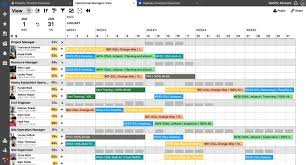
Ganttic: The Smart Way to Turn Resource Chaos Into Clear, Confident Planning
Ganttic is designed for teams that need more clarity, less guesswork, and a better way to manage resources across projects. According to Ganttic’s official product pages, it is a resource planning and scheduling platform built to help teams visualize workloads, allocate people and equipment, track capacity, and keep project execution organized in real time. It positions itself not just as a scheduling tool but as a practical system for managing resources across project portfolios, which matters for teams that work on multiple jobs at once and cannot afford overlap, overbooking, or missed opportunities.
That focus on visibility is what makes Ganttic especially interesting for modern teams. Instead of relying on scattered spreadsheets, email threads, or memory, users can see who is available, who is booked, what is coming next, and where capacity is tightening. Ganttic’s official resource scheduling page highlights visual Gantt-style planning, real-time updates, workload tracking, and drag-and-drop allocation as core parts of the experience. For teams trying to stay efficient without making planning overly complicated, that combination is a strong advantage.
Resource planning often fails for a simple reason: the team grows faster than the system. One project turns into ten, one department turns into many, and suddenly the person who manages schedules is spending more time reconciling data than making decisions. Ganttic is built around avoiding that problem. Its official pages emphasize clarity, workload balance, and conflict spotting before problems spread. That means the software is not just helping teams assign work; it is helping them make better choices about how much work they should accept in the first place.
Why Ganttic Matters When Teams Need Better Visibility
The best planning tools do more than display tasks. They help organizations understand the reality of their capacity. Ganttic’s own messaging repeatedly centers on “doing more with less,” sustainable resource usage, and avoiding underutilization and burnout. That is a useful philosophy because resource management is not only about filling calendars; it is about protecting team health, improving predictability, and making sure the right people or assets are available at the right time. When capacity is visible, planning becomes a strategic function instead of a reactive chore.
This is particularly important in companies that juggle multiple priorities at once. Ganttic’s official pages describe it as useful for project portfolio management, project management, resource management, and capacity planning, which suggests a broad use case beyond a single team or department. In practice, that means organizations can look at the big picture while still managing the details of individual bookings. A project manager can see one timeline, a department lead can see another, and leadership can still get the portfolio-level view needed for decision-making.
For businesses that still rely on spreadsheets, the switch to a structured resource planning tool can feel overdue almost immediately. Ganttic’s official material positions the platform as an alternative for teams that want real-time visibility into resource availability, better coordination, and a clearer scheduling process. That matters because planning is rarely the hard part; the hard part is keeping the plan current when things change. The more dynamic the team, the more valuable a live scheduling environment becomes.
Another reason Ganttic stands out is that it is not trying to be vague or generic. The platform’s language focuses on specific operational outcomes: fewer conflicts, better workload balance, faster allocation, and better forecasting. That makes it appealing to organizations that want a practical system, not a bloated one. For busy teams, a tool succeeds when it reduces friction and supports better decisions. Ganttic’s official positioning shows that this is exactly the problem it is trying to solve.
The Features That Make Ganttic Useful in Real Work
One of Ganttic’s strongest features is its visual scheduling model. Its official resource scheduling page describes clear, visual plans built with resource-centric Gantt charts, which allow users to see availability, conflicts, and upcoming workloads at a glance. That is valuable because visual planning reduces mental load. Instead of reading lists or comparing disconnected data points, teams can recognize patterns quickly and adjust plans before they become problems.
Drag-and-drop scheduling is another practical advantage. Ganttic says users can click, drag, and release tasks for new bookings, then reallocate work to lighten the load. That kind of interaction is important because planning should feel responsive, not rigid. When priorities change, the schedule needs to change with them. If the tool is hard to use, people avoid it. If it is intuitive, planning stays current and useful.
Custom data fields also make the software more adaptable. Ganttic notes that teams can organize resources using custom data fields so they can filter by location, hours, certifications, or other job-specific requirements. That matters because not every team is scheduling identical resources. Some need people with specific skills. Some need equipment under certain weight limits. Some need staff in different time zones. The ability to organize data in a meaningful way helps Ganttic stay flexible across industries and operating styles.
Workload tracking is another feature that supports better decision-making. The official site says users can track planned hours and utilization to understand who has capacity for more work and to reduce both underutilization and burnout. That is a thoughtful detail, because resource planning should not only maximize output; it should also protect people and keep teams sustainable. A planning system that highlights overload early is more valuable than one that merely records it after the fact.
Ganttic also emphasizes real-time updates. On its scheduling page, it says users can get updates of the present and draft plans for what is to come. This matters because project reality changes constantly. A sick day, a delayed delivery, a new client request, or a sudden priority shift can break a plan that looked perfect yesterday. Real-time visibility makes it easier to react quickly and keep work moving.
A Better Fit for Multi-Project Teams and Resource Portfolios
Ganttic is especially relevant for teams that do not manage just one project at a time. Its project portfolio management page says it gives users a centralized, big-picture view of resources across all projects. That portfolio mindset is crucial when several teams, timelines, and deadlines overlap. The value is not only in seeing each project clearly, but in seeing how all those projects compete for the same limited people, tools, or equipment.
The platform also describes dynamic Gantt charts and drag-and-drop allocation as a way to prioritize efficiently across projects. That is important because multi-project planning is less about isolated schedules and more about tradeoffs. A resource assigned to one initiative is no longer fully available for another. Ganttic’s approach helps teams understand those tradeoffs earlier, which can improve delivery decisions and reduce late-stage surprises.
On the same page, Ganttic says it has supported users globally for more than 15 years and connects teams across 120 different countries and 40+ industries. Those details suggest a platform that has found use well beyond a narrow niche. For readers evaluating tools, that breadth can be reassuring because it indicates the system has been applied in a wide variety of real-world settings.
Ganttic also highlights integration support through Zapier and a custom API, along with references to MS Project and ClickTime. That matters because many organizations do not want to replace every tool they already use. They want the scheduling layer to connect with the broader workflow. A flexible integration approach makes it easier for planning data to move across systems instead of living in one isolated place.
The official site also presents a “less data entry” outcome and says the platform can reduce planning time and misaligned data. That is a major selling point for anyone who has ever copied the same project information into multiple systems. Less duplication means fewer errors, faster updates, and a cleaner planning process overall. In resource management, removing unnecessary admin work can be just as important as adding new features.
Built for Many Industries, Not Just One Type of Team
One reason Ganttic has broad appeal is that it is positioned for a wide range of industries. Its official pages mention construction, engineering, consultancies, ICT, creative agencies, environmental services, architecture, and more. That range matters because resource planning is a universal operational challenge, even if the resources themselves are different. A construction firm may schedule crews and equipment, while a creative agency may schedule designers and account leads. The planning problem remains the same: make sure the right resource is available at the right time.
The resource scheduling page specifically says the software can adapt to many industries and different planning needs. It highlights the ability to find the best resource based on working hours, location, or certifications, which makes the system practical for teams with specialized requirements. That kind of flexibility is especially helpful in organizations where a simple calendar is not enough. If the team needs to account for special skills or equipment limits, a more advanced resource planner can save time and reduce mistakes.
Ganttic also appears to support both people-based and equipment-based planning. Its official solution categories include equipment scheduling, resource management, and capacity planning. That is a useful combination because many businesses do not only schedule staff. They also schedule vehicles, machines, rooms, or shared assets. When a single platform can handle different resource types, planning becomes more consistent across the organization.
This versatility can be a major advantage for companies that are growing. As teams expand, so do the planning variables. A system that worked when the business was small may fail once there are multiple departments, field teams, or long-term project streams. Ganttic’s official messaging suggests it was built to remain understandable while still scaling into complex portfolios and larger organizations. That balance between simplicity and scale is often where many tools succeed or fail.
There is also a human side to all of this. When a planning system is clear, people trust it more. They know where they stand, what they are responsible for, and how busy they really are. That can improve communication across departments and reduce the stress that comes from unclear assignments. Ganttic’s own case-study style quotes and product language point toward that same outcome: better visibility, better coordination, and less uncertainty in daily work.
Why Ease of Use Matters as Much as Power
Many planning platforms fail because they are technically powerful but practically exhausting. Ganttic tries to solve that by emphasizing intuitive use. Its official FAQ says the platform is designed to be user-friendly even for people who are new to resource scheduling software, and that tutorials, guides, support, and demos are available to help users get started. That is important because adoption is everything. Even the smartest tool is useless if the team refuses to use it consistently.
The official pages also point to mobile support through the Ganttic Planner app. A recent blog update says the app now includes resource filtering, making it easier and faster to find the right people for the job. That is a helpful improvement because planning rarely happens in one place anymore. Teams work remotely, visit job sites, move between meetings, and make decisions on the go. Mobile access helps keep schedules usable outside the desktop environment.
That mobile flexibility becomes even more useful when scheduling changes happen quickly. If a manager is traveling or a field supervisor is away from the office, they still need a way to check availability and make adjustments. The more immediate the access, the less likely a team is to rely on outdated information. Ganttic’s emphasis on filtering and mobile convenience suggests it understands that planning happens in motion, not only at a desk.
Another reason ease of use matters is that it affects reporting quality. If the interface is confusing, data gets entered inconsistently, which makes the outputs less trustworthy. But if the process is smooth, users are more likely to keep schedules up to date. That leads to better visibility, better forecasting, and better resource decisions. In other words, usability is not a cosmetic feature; it is part of the planning engine itself.
Ganttic’s project management page also says the platform offers intuitive Gantt charts, customizable reporting, and real-time updates. Those elements help turn raw scheduling data into something usable for day-to-day management. A planning tool only becomes valuable when people can understand it quickly and act on it with confidence. That is where Ganttic’s emphasis on simple, visual scheduling really fits the needs of busy teams.
How Ganttic Supports Smarter Decisions, Not Just Faster Scheduling
The strongest planning tools do more than save time. They help leaders make better decisions. Ganttic’s official messaging reflects that idea by focusing on availability, utilization, bottlenecks, and forecasting. If a team can see capacity before taking on new work, it is easier to say yes to the right projects and no to the wrong ones. That is a strategic advantage, especially in environments where overcommitment can damage quality, margins, and morale.
Ganttic’s case-study style content reinforces that point. One client quote says the platform helps estimate workloads and forecast when new projects can be taken on. That is a meaningful use case because planning is not just about assigning the next task; it is about understanding whether the organization can realistically absorb more work. With stronger forecasting, teams can protect delivery timelines and reduce the risk of overpromising.
The same logic applies to capacity planning. If you can see where people are underused, you can rebalance workloads before productivity drops. If you can see where people are overloaded, you can redistribute tasks before burnout rises. Ganttic’s official pages repeatedly highlight this balance between utilization and overload, which is one of the most important principles in modern resource management. Good planning is not about squeezing the most out of every person every minute; it is about matching demand to capacity in a sustainable way.
The platform’s structure also helps reduce the hidden cost of poor data. Ganttic’s portfolio management page says it can cut misaligned data and reduce planning time. That matters because inaccurate planning information creates false confidence. A schedule can look clean while hiding conflicts beneath the surface. By centralizing planning and making schedules visible, Ganttic can help reduce those blind spots.
When a business wants to operate with more confidence, better visibility is one of the fastest ways to get there. Ganttic’s model supports that by helping teams see what is happening now, what is planned next, and what capacity remains. That gives managers a stronger base for staffing, project selection, client communication, and internal coordination. In practical terms, better information leads to better action.
Pricing, Access, and the Best Way to Start
One of the most attractive aspects of Ganttic is that it lowers the barrier to entry. The official scheduling page says users can start for free, and the pricing page explains that organizations with fewer than 10 resources can use the software for free without a credit card for signup. The project portfolio management page also says there is a 14-day free trial with no credit card required. That kind of access makes it easier for teams to test the platform in real conditions before making a commitment.
This matters because planning software should prove its value quickly. Teams are not just buying a tool; they are changing a process. A free start gives them room to compare the old workflow against the new one. They can check whether schedules are easier to understand, whether workloads are clearer, and whether the team is actually spending less time wrestling with planning admin. When the software is good, the value should become visible early.
The company also provides a live demo option and support resources, which can be especially helpful for teams that want guidance while testing the platform. That is a smart setup because scheduling systems often need a little context before they fully click. A demo can help users understand how the views, fields, filters, and workload settings fit together in a real workflow.
For businesses comparing different tools, that combination of access and support is important. It shows that the platform is not only built for use, but also for adoption. Teams can explore, ask questions, and decide whether the system fits their process before they roll it out more broadly. In a crowded software market, that kind of practical onboarding can make a big difference.
If your team is still planning resources in spreadsheets, disconnected calendars, or chat threads, Ganttic is worth a serious look. Its official product pages show a platform built for visual clarity, workload control, project portfolio visibility, and flexible scheduling across many industries. The easiest next step is to try it against your real workload and see how much more quickly your team can understand capacity, allocations, and project timing. Start with the free option or a demo, then judge the difference for yourself.
Final Thoughts on Ganttic and Why It Stands Out
Ganttic stands out because it treats resource planning as a strategic activity, not a clerical one. Its official pages show a platform that helps teams schedule people and equipment, track utilization, prevent conflicts, and manage portfolios with more confidence. It also supports customization, integrations, mobile access, and a range of industries, which makes it flexible enough for real-world operations. For teams that need better visibility without unnecessary complexity, that is a powerful combination.
The bigger message behind Ganttic is simple: when planning is clear, work becomes calmer, faster, and more predictable. Teams spend less time guessing, managers make better decisions, and projects move with fewer surprises. If your organization is ready to replace planning friction with a smoother system, Ganttic offers a practical place to begin. Try it, test it, and see how much easier resource planning can feel when the right information is visible at the right time.
CTA: Ready to bring more clarity to your scheduling process? Explore Ganttic’s free trial or free plan, review the visual planning features, and see how quickly your team can move from scattered updates to confident resource management.