
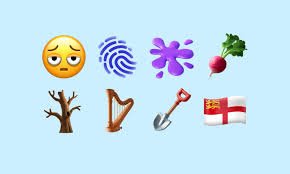
Apple’s emoji updates rarely cause this much excitement, but the new emojis iOS 18.4 preview brought exactly that kind of attention. In the second beta of iOS 18.4, Apple gave users an early look at its latest emoji batch, bringing fresh visual language to the iPhone keyboard and setting the tone for one of the more talked-about updates of the season. The rollout was based on Unicode’s Emoji 16.0 set, and Apple later confirmed that the public iOS 18.4 release added support for 8 new emojis across iPhone, iPad, Mac, Apple Watch, tvOS, and visionOS.
New emojis iOS 18.4: the first look everyone is talking about
The best part of Apple’s emoji updates is that they often feel small at first glance, but they change everyday messaging in a real way. With iOS 18.4 beta 2, Apple previewed a set of Unicode 16.0 emojis that were designed to express things people actually say and feel every day: exhaustion, identity, nature, tools, music, and even a little artistic chaos. Emojipedia’s first-look coverage described the beta as Apple’s latest preview of Unicode emojis and noted that the update introduced a new set of symbols to the standard emoji keyboard, while Apple’s later public release confirmed support for the Emoji 16.0 batch.
What makes this release interesting is not just the number of icons, but the mix itself. Apple added Face with Bags Under Eyes, Fingerprint, Leafless Tree, Root Vegetable, Harp, Shovel, Splatter, and Flag of Sark in the final iOS 18.4 release, while beta 2 gave users an early look at the same emoji direction before the public rollout. That means this update is both practical and playful: it gives people more ways to communicate ordinary moods, but it also adds a few niche symbols that help the keyboard feel more complete and more culturally aligned with the Unicode standard.
Why Apple’s new emoji rollout matters more than it looks
Emoji updates aren’t just cosmetic—they shape how people communicate. The new emojis iOS 18.4 fill key gaps by adding both expressive and practical symbols. With 8 new emojis covering emotions, objects, and nature, Apple is improving how users quickly express feelings and ideas in everyday conversations.
That balance is a big reason emoji launches get so much attention. Apple does not create emoji in a vacuum; it implements characters approved through Unicode, then gives them its own visual design language. That means the emoji set has to work across devices and feel familiar enough to be instantly readable. Once a new emoji is supported by Apple, it becomes part of everyday communication for millions of users, which is why even a modest update can create a noticeable ripple in texting culture. The public iOS 18.4 release made those emojis broadly available, and Apple’s support page confirms that they are now in the emoji keyboard as part of the wider OS update.
What exactly is new in iOS 18.4 beta 2?
The headline star of this update is Face with Bags Under Eyes, which immediately stands out because it captures a mood people use all the time: tired, drained, overstretched, or just done with the day. In the real world, that emoji is likely to become one of the most-used additions because it communicates emotion instantly without needing a full sentence. Alongside that, Fingerprint adds a symbol tied to identity, security, and detection; Leafless Tree evokes winter, emptiness, or seasonal change; and Root Vegetable gives food and gardening conversations a fresh visual option. Apple’s emoji list for iOS 18.4 confirms the full set, and MacRumors’ beta 2 coverage specifically highlighted the same batch of new characters.
The remaining additions are just as useful in their own way. Harp is a welcome music-related symbol that feels more elegant than many of the emoji choices already on the keyboard. Shovel is practical, covering gardening, construction, digging, cleanup, and even metaphorical “digging into” something. Splatter adds a messy, artistic, or dramatic visual element that can work in both literal and sarcastic contexts. Finally, Flag of Sark expands the flag set with a regional identity emoji that reflects Unicode’s ongoing commitment to representation. Emojipedia’s beta 2 article also noted that Apple updated the design of the Flag of Syria in the same release window, showing that emoji updates sometimes include design revisions in addition to brand-new entries.
How Apple is rolling the emojis out across devices
One of the most useful things to know about the new emojis iOS 18.4 rollout is that it is not limited to iPhone. Apple’s release notes show that iOS 18.4, iPadOS 18.4, tvOS 18.4, watchOS 11.4, macOS 15.4, and visionOS 2.4 all received support for the same 8 new emojis. That matters because it keeps conversations visually consistent across the Apple ecosystem, so a message sent from an iPhone can be displayed more reliably on a Mac, an Apple Watch, or a Vision Pro device. For users who move between devices all day, that kind of consistency is part of the appeal.
Apple’s beta behavior is also worth noting. In the first look reported by Emojipedia, the new emojis were present in iOS 18.4 beta 2, but they were not yet organized into the standard emoji keyboard categories. Instead, users could find them through search. That is a classic beta pattern: the support exists, but the experience still needs refinement before the public release. By the time iOS 18.4 shipped, Apple had fully integrated the emoji support into the platform, and its support page describes the update as including the new emoji in the keyboard.
There is also an important compatibility detail that users often overlook. Once Apple rolls out a new emoji, people running older software may not see it the same way. 9to5Mac noted that users on iOS 18.3 or earlier could see a blank icon when receiving the new symbols from someone on iOS 18.4 or later. That is why the update matters even if someone does not plan to use the new emojis immediately: the visual language of texting changes for everyone once enough people upgrade.
The most likely fan favorites in the new set
Among all the additions, Face with Bags Under Eyes is almost certainly the breakout emoji. It fits the way people actually talk online: tired from work, tired from school, tired from travel, tired from news, or simply tired of being tired. That makes it instantly relatable, and relatable emoji tend to spread quickly because they save users from typing out a full mood. The “exhausted face” has already been widely discussed in coverage of iOS 18.4, which tells you how strong its appeal is compared with the more niche symbols in the release.
Fingerprint is another likely standout because it feels modern and useful without being overly specific. It can represent privacy, authentication, investigation, uniqueness, or even subtle suspicion depending on the conversation. That kind of flexible meaning gives emoji longevity, because people can reuse it in different contexts. Splatter also has strong potential because it works in artistic posts, messy-life jokes, creative branding, and even chaotic commentary. The more interpretation an emoji allows, the more ways people find to reuse it. Those are usually the emoji that become part of everyday shorthand rather than fading into novelty.
Then there are the quieter but still valuable additions like Leafless Tree, Root Vegetable, Harp, and Shovel. These may not dominate social feeds on day one, but they fill important communication gaps. The leafless tree can represent winter or loss; the root vegetable can be used in food, gardening, and playful “turnip” style jokes; the harp covers music and elegance; and the shovel serves both literal and metaphorical use cases. Small symbols often become surprisingly useful because they solve specific communication needs that users did not realize were missing until they were available.
What this update says about Apple’s emoji strategy
Apple’s emoji strategy is usually consistent: wait for Unicode approval, design the emoji in Apple’s own style, then roll it out in a way that fits the broader ecosystem. That process may sound simple, but it helps explain why Apple emoji updates tend to feel polished even when they are relatively small. The company is not trying to overwhelm users with volume. Instead, it is adding useful symbols in measured batches, then making sure they work across platforms and stay recognizable in messaging apps, system keyboards, and social posts. Apple’s release notes and Emojipedia’s version tracking both show that iOS 18.4’s new emoji set comes from Emoji 16.0, which was the standards-based foundation for the rollout.
This is also a sign of how emoji design has matured. Early emoji libraries focused on basic emotions and objects. Modern updates now reflect more specific feelings, symbols, and real-world details. A tired face, a fingerprint, a root vegetable, and a regional flag may seem random at first, but together they represent a communication system that is trying to cover the broad range of human expression. That is one reason people pay attention to these updates: they are often a mirror of what digital conversation has become. Emojipedia’s first-look post and Apple’s final release notes both show that these symbols are now part of the everyday Apple experience, not just a beta curiosity.
For creators, marketers, and bloggers, that matters a lot. Emoji trends often travel into headlines, thumbnail concepts, social captions, and community replies. A fresh emoji release can give content a more current tone and make it feel closer to the way people actually talk online. That is exactly why the phrase new emojis iOS 18.4 will continue to search well: users want to know what changed, what the symbols look like, and which ones are worth using first. The more quickly you explain the update in a clear, human way, the more likely readers are to stay on the page and explore the rest of your content.
How to make the most of the new emojis in everyday use
The smartest way to use new emoji is not to force them into every message, but to use them where they add clarity or personality. The tired face will work best when you are describing stress, burnout, lack of sleep, or a long week. The fingerprint will be useful when you are talking about security, login issues, evidence, identity, or something uniquely “yours.” The leafless tree can add seasonal atmosphere, while the root vegetable may become a favorite in food posts, wellness posts, gardening posts, and humorous reaction messages. In other words, the value of the update is not just novelty; it is precision.
Businesses and content creators should pay attention too. New emoji can make a headline, caption, or social post feel more current, but only when used with restraint. If a brand uses the tired face emoji in a post about deadlines, for example, it can instantly communicate empathy. If a music creator uses the harp in a post about a new track, it can add elegance or classical flair. If a lifestyle blogger uses splatter in a post about art, crafts, or messy creativity, the tone becomes more vivid. Because iOS 18.4’s emoji are available across Apple platforms, there is also less friction when the audience is inside the Apple ecosystem.
There is one more practical point worth repeating: compatibility. If you are writing for an audience that includes people on older devices, you should expect some variation in how these symbols appear. Apple’s rollout means the emoji are supported on newer software, but users on earlier versions may not see them properly. That is normal for any major emoji release, and it is part of why update coverage gets so much search traffic. People want to know not just what is new, but also whether their friends, coworkers, and followers will see the same thing.
The bigger picture behind iOS 18.4’s emoji update
The emoji update is only one part of iOS 18.4, but it is one of the most visible parts because it affects how people communicate immediately. Apple’s support documentation shows that the release also includes broader changes such as Siri voice options, Safari improvements, App Store changes, Podcast widgets, Ambient Music, new system language support, and more. That broader package matters because it shows Apple is treating iOS 18.4 as a substantial update rather than a narrow feature drop. Still, the emoji story stands out because it is the part most users will notice first in everyday messaging.
It is also interesting that Apple’s emoji additions come with a very human flavor. One symbol reflects burnout, another identity, another seasonal barrenness, another food, another music, another mess, and another regional representation. Together they paint a small but surprisingly accurate picture of how people communicate online in 2025. That is why emoji coverage remains such a strong content topic: it sits at the intersection of technology, design, language, and culture. The public release of iOS 18.4 made those symbols official for Apple users, and the beta 2 preview gave early adopters a first taste of what was coming.
Final thoughts on the new emojis iOS 18.4 users should know about
Apple’s iOS 18.4 emoji update is a good reminder that small features can still make a big difference. The new emojis iOS 18.4 brings are not flashy in the usual sense, but they are practical, expressive, and easy to understand. That combination is exactly why they are likely to show up in everyday chats, captions, posts, and replies far more often than many larger software features. The final public release confirms support for 8 new emojis, while the beta 2 preview gave users a first look at the direction Apple was taking before the update became widely available.
If you are a reader, a creator, or a site owner writing about Apple updates, this is a topic worth covering quickly and clearly because people search for it as soon as a beta drops. The most clickable angle is simple: explain what the new emoji are, what they mean, and why they matter in real use. That is what keeps visitors reading. It is also what helps content feel useful instead of generic. And in a search landscape where clarity wins, the strongest pages are the ones that answer the obvious question right away: what exactly is new, and how can I use it?
So the bottom line is this: iOS 18.4 beta 2 gave Apple users an early look at a fresh batch of emojis, and the final release turned that preview into a full rollout across the Apple ecosystem. Whether you are excited about the tired face, the fingerprint, the shovel, or the harp, this update proves that even the smallest icons can have a big cultural impact. Keep an eye on these emoji, use them naturally, and bookmark this page for more Apple beta coverage and future iOS updates.