
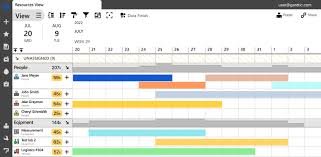
Project teams in 2026 are under more pressure than ever to deliver faster, stay profitable, and avoid burnout. That is exactly why project resource scheduling software tools has become a must-have instead of a nice-to-have. The best platforms do more than fill a calendar. They help you plan people, equipment, time, capacity, workloads, and project timelines in one place, so managers can make better decisions before conflicts turn into missed deadlines.
Project Resource Scheduling Software: 40 Best Tools to Try in 2026
The tools below are my editorial shortlist for teams that want better visibility, smoother allocation, and stronger control over how work gets assigned. I am focusing on platforms that support real scheduling, workload balancing, forecasting, time tracking, and resource visibility, because those are the capabilities that show up again and again in 2026 buying guides and product pages.
Before you choose any platform, look for four things: clear capacity views, conflict prevention, reporting, and integrations with the tools your team already uses. The strongest resource scheduling platforms make it easy to see who is overbooked, who has availability, and how upcoming work will affect delivery. They also reduce manual spreadsheet work, which is still one of the biggest reasons resource planning breaks down.
Float, Wrike, MRPeasy, and Scoro are four of the strongest starting points if you want a modern scheduling layer with real business value. Float is built around profitable resource scheduling and live schedules; Wrike is positioned for complex projects and capacity planning; MRPeasy is aimed at manufacturer resource planning; and Scoro is known for real-time workload visibility.
Productive, Kantata, Hub Planner by Milient, and Bonsai Agency Software are especially useful for service teams that need more than basic task assignment. Productive is positioned for agencies and professional services, Kantata for people-centric resource scheduling, Hub Planner for mid-sized to large companies, and Bonsai for resource planning and forecasting. If your revenue depends on billable time, these tools deserve a serious look.
Resource Guru, Connecteam, Hive, and Microsoft Project cover very different planning styles, but all four solve the same core problem: getting the right people into the right work at the right time. Resource Guru focuses on capacity planning with timesheets, Connecteam on multi-location shift scheduling, Hive on team availability, and Microsoft Project on deeper Microsoft-friendly planning workflows.
ActiveCollab, Birdview, Schedule It, and Jira each appeal to teams with a slightly different scheduling pain point. ActiveCollab is a fit when client invoicing matters, Birdview is aimed at professional services companies, Schedule It is positioned for contractor scheduling, and Jira remains a popular choice for teams that want issue tracking tied closely to delivery work.
Planview AdaptiveWork, elapseit, Ezo, and Parallax are often better suited to teams that are already thinking beyond simple task calendars. Planview AdaptiveWork is framed for enterprise project management, elapseit for integrated financial features, Ezo for centralized asset requests, and Parallax for software development firms that need a more structured approach to resourcing.
Runn, Harvest, Forecast, and Toggl Plan are all good examples of the newer planning-first tools that emphasize visibility and day-to-day resource control. Runn is widely described as a purpose-built resource management tool for professional teams, while Harvest, Forecast, and Toggl Plan appear consistently in 2025–2026 resource scheduling shortlists. These are especially helpful for teams that want a clean interface without sacrificing planning depth.
Paymo, Streamtime, and Everhour round out the productivity-heavy part of the market. They show up in resource scheduling roundups because they help teams connect work allocation with time tracking and day-to-day execution. For smaller agencies and lean teams, this kind of tool can be a practical middle ground between a spreadsheet and a heavyweight enterprise suite.
Asana, monday work management, ClickUp, and Smartsheet Resource Management are excellent if you want resource control inside a broader work management platform. Asana’s resource management feature is built to help teams plan accurate timelines and rebalance work; monday highlights resource management, scheduling, and workload visibility across its work platform; ClickUp offers resource management views for workload and allocation; and Smartsheet’s Resource Management supports balance, time tracking, and staffing forecasts.
Zoho Projects, Celoxis, Teamwork.com, and ProjectManager are particularly appealing for teams that want scheduling plus execution discipline. Zoho Projects supports resource allocation and workload visibility, Celoxis emphasizes resource management, capacity planning, and portfolio visibility, Teamwork.com offers resource and workload management for billable teams, and ProjectManager includes advanced resource management with schedules, workloads, timesheets, and real-time tracking.
Meisterplan, Adobe Workfront, Ganttic, Bitrix24, and Ravetree are strong choices for companies that need resource planning across multiple projects, departments, or client engagements. Meisterplan positions itself as portfolio-level resource management software; Adobe Workfront includes resource management, workload balancing, and forecasting; Ganttic is built around visual resource schedules and workload tracking; Bitrix24 offers an all-in-one workspace for team and project management; and Ravetree combines project, schedule, and resource planning in one platform.
How to Choose the Right Tool for Your Team
The best project resource scheduling software is not always the one with the longest feature list. It is the one that matches your team size, your pricing model, your work style, and your reporting needs. A small agency may care most about profitability, workload clarity, and billable utilization, while an enterprise PMO may care more about governance, scenario planning, and portfolio-level visibility. The sources across 2026 consistently point to the same buying criteria: scheduling, forecasting, utilization, integrations, and ease of use.
A smart way to shortlist software is to test it against one real project before rolling it out team-wide. Look at how quickly you can assign work, see conflicts, adjust capacity, and generate a schedule that stays current as priorities change. Also,o check whether the platform fits your existing stack, because integrations with tools like Jira, Slack, Google Calendar, Microsoft 365, or CRM systems can save a huge amount of manual work.
Budget matters too, but price alone should never decide the purchase. Some platforms start with low per-user pricing, while others price on request because they are built for larger organizations and more complex workflows. In general, the cheapest tool is not the best tool if it creates more manual work, slows down planning, or hides overloads until delivery is already at risk.
Why Resource Scheduling Software Helps You Work Smarter
Good resource scheduling software gives managers a clearer view of demand versus capacity. That means fewer double-bookings, less burnout, stronger forecasting, and better use of your team’s time. It also makes it easier to shift work when timelines move, which is one of the biggest reasons project plans fall apart in the real world.
For growing businesses, the biggest benefit is not just organization. It is control. When you can see who is available, what skills they have, how much work is already assigned, and how each decision affects the next few weeks of delivery, you can make better staffing choices and protect margins at the same time. That is why so many 2026 tools now emphasize capacity planning, workload charts, forecasting, and financial visibility.
Final Recommendation
If you want the fastest path to a better workflow, start with three demos and one live project test. Compare how each platform handles capacity, workload balancing, time tracking, and conflict management. Then choose the one that makes planning feel obvious, not stressful. That is usually the tool your team will actually use every day.
FAQ About Project Resource Scheduling Software
What are resource management software reviews? It is software that helps you plan, assign, and manage resources such as people, equipment, and time across projects. The goal is to make sure the right resources are available at the right time, while reducing conflicts and improving team efficiency.
Who needs it most? Agencies, professional services firms, PMOs, software teams, and multi-project organizations usually benefit the most because they deal with changing priorities, shifting timelines, and limited capacity. Tools like Float, Productive, Kantata, Teamwork.com, and Meisterplan are especially aligned with those needs.
Should you choose a standalone scheduler or an all-in-one platform? Standalone schedulers are often better when scheduling is your main pain point, while all-in-one platforms work well when you want scheduling, task management, and reporting in the same system. That is why tools like Resource Guru and Runn sit alongside platforms such as monday work management, Asana, ClickUp, Smartsheet, and Zoho Projects.
What features should rank highest on your checklist? Capacity planning, drag-and-drop scheduling, workload views, forecasting, time tracking, integrations, and reporting should all be near the top. Those are the features that show up most often in current resource scheduling reviews and product pages because they directly affect utilization and delivery.
Conclusion
Choosing the right project resource scheduling software in 2026 is no longer optional—it’s a smart move for any business that wants to stay competitive, organized, and profitable. With so many powerful tools available, the key is not to pick the most popular option, but the one that truly fits your workflow, team size, and project needs. The right software will help you balance workloads, avoid scheduling conflicts, and make better decisions based on real-time data.
As projects become more complex, relying on manual planning or outdated systems can slow your growth. Modern resource scheduling tools give you clear visibility, better control, and improved efficiency across every stage of your projects. They also help teams collaborate more effectively, reduce stress, and deliver results faster without overloading resources.
Now is the perfect time to upgrade your workflow. Start by shortlisting a few tools from this list, testing their features, and seeing which one aligns best with your goals. Don’t wait until inefficiencies cost you time and money—take action today and transform the way you plan, manage, and scale your projects with the best resource scheduling software available.